
Release Notes 2026.3.17.0
September 29–November 3, 2026: Fleet now sets up and maintains your servers, File Drop gives customers their own SFTP and FTP logins, and Insights watches every machine's sign-ins and adds ClickUp, HubSpot, Intercom, and GitLab views. The Admin Panel is redesigned, Quote Generator works out discounts for you, public maps load faster, and every time shows in your local time.
This release brings a new Fleet, File Drop, and a much wider Insights. Fleet now sets up and maintains your servers, File Drop gives customers their own SFTP and FTP logins, and Insights watches every machine's sign-ins and adds ClickUp, HubSpot, Intercom, and GitLab views. Around them: a redesigned Admin Panel, Quote Generator pricing that does the math for you, faster public maps, a full sign-in history, and every time shown in your local time.
Fleet
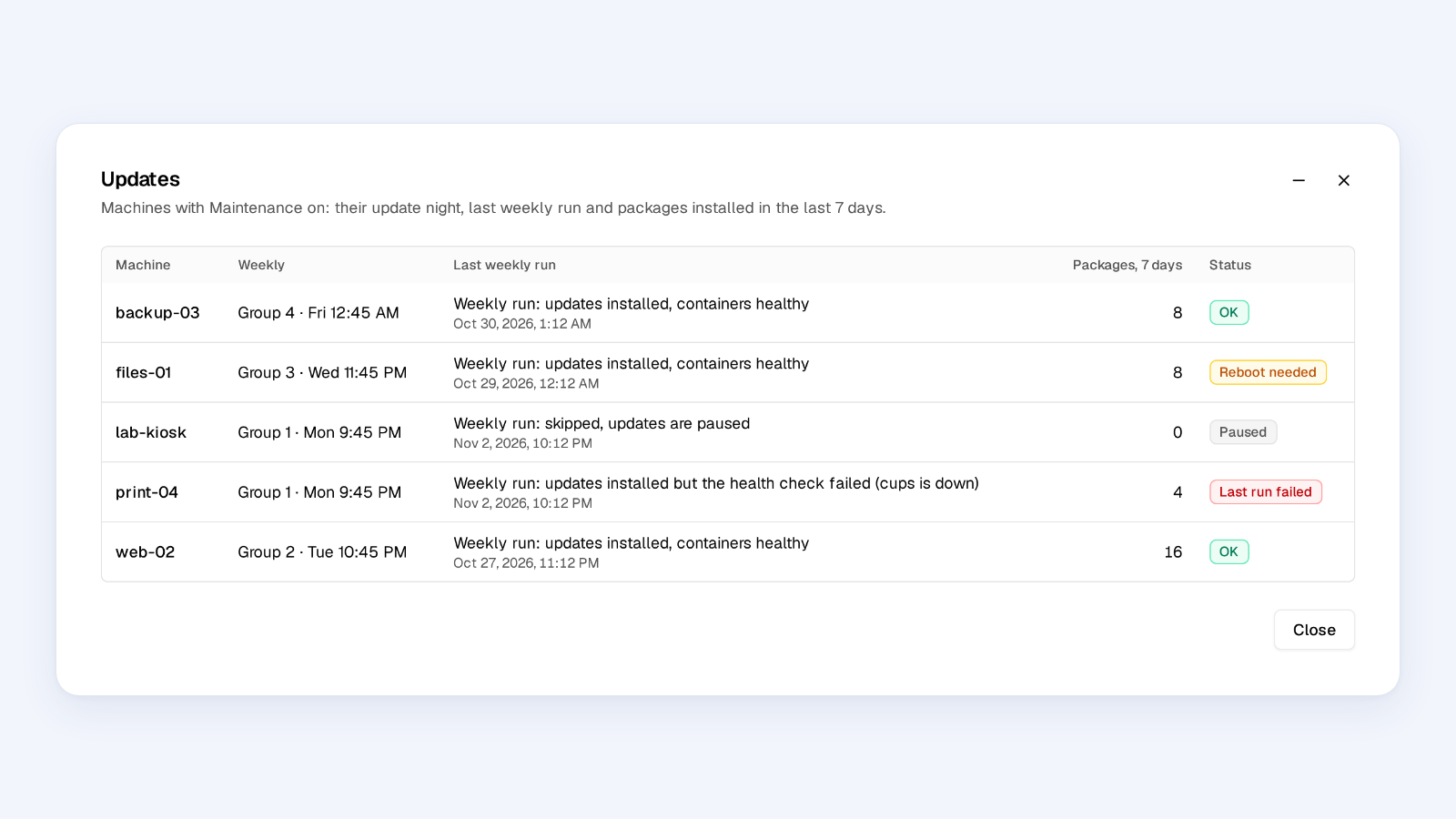
Fleet is one page for every machine you manage, with its SSH login and Creovia agent side by side. It can set up a new server for you and then keep it patched: nightly security updates, weekly updates on the machine's own update night, and reboots only after a health check. Each machine shows its full update history, package by package. Servers set up the old way can be adopted without changing their schedule.
To open, go to Operations > Fleet. Existing SSH Servers links open Fleet.
File Drop
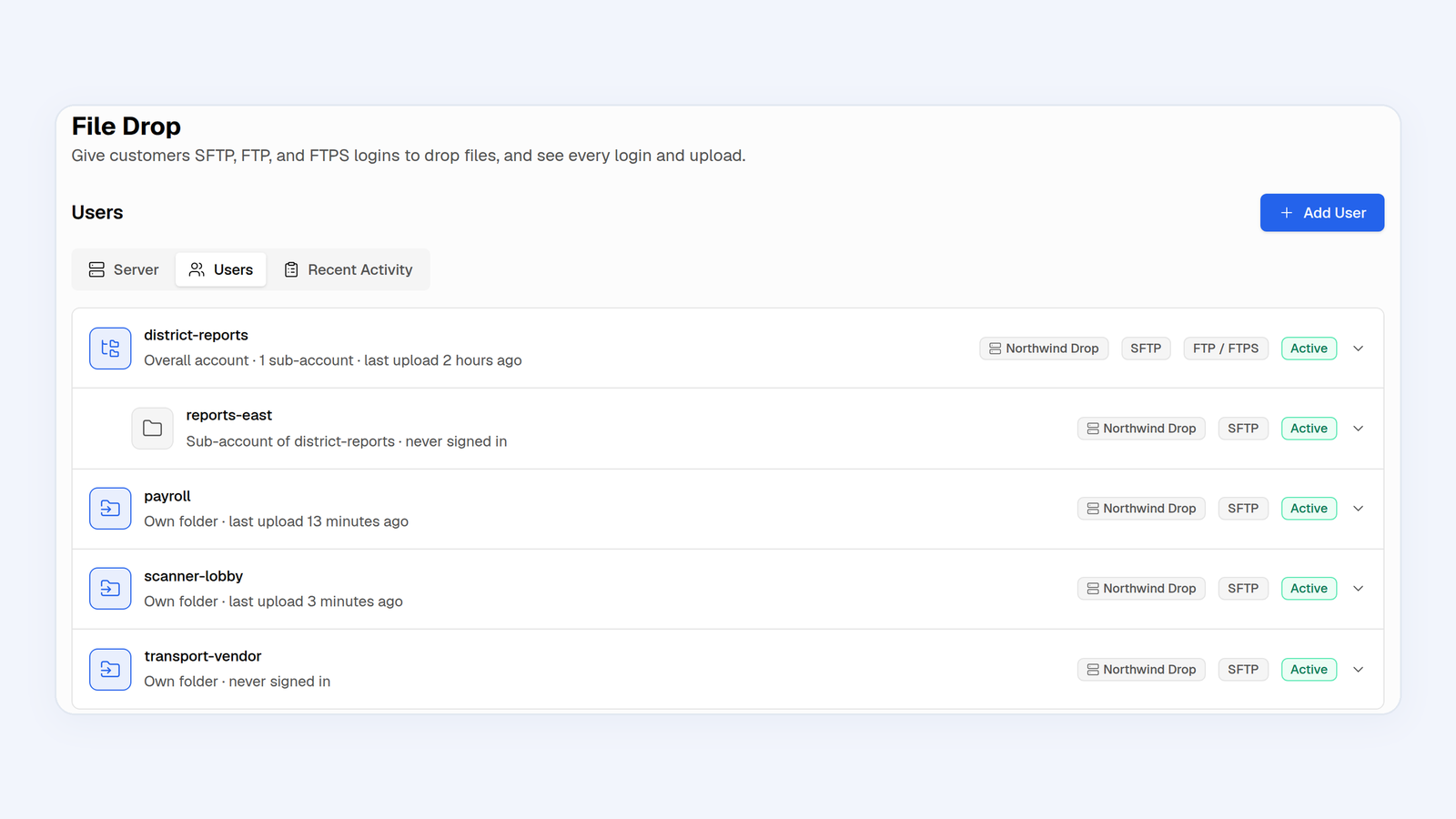
Give customers and vendors their own SFTP, FTP, or FTPS login for sending you files, instead of email attachments or shared cloud folders. Each login gets a generated password, plus optional SSH keys, read-only or no-delete rules, an IP allowlist, and an expiry date. Sub-accounts get their own folder inside the parent's folder, and Recent Activity lists every sign-in, failed attempt, and upload.
To open, go to Operations > File Drop. File Drop runs on a Fleet machine with the agent installed.
Insights
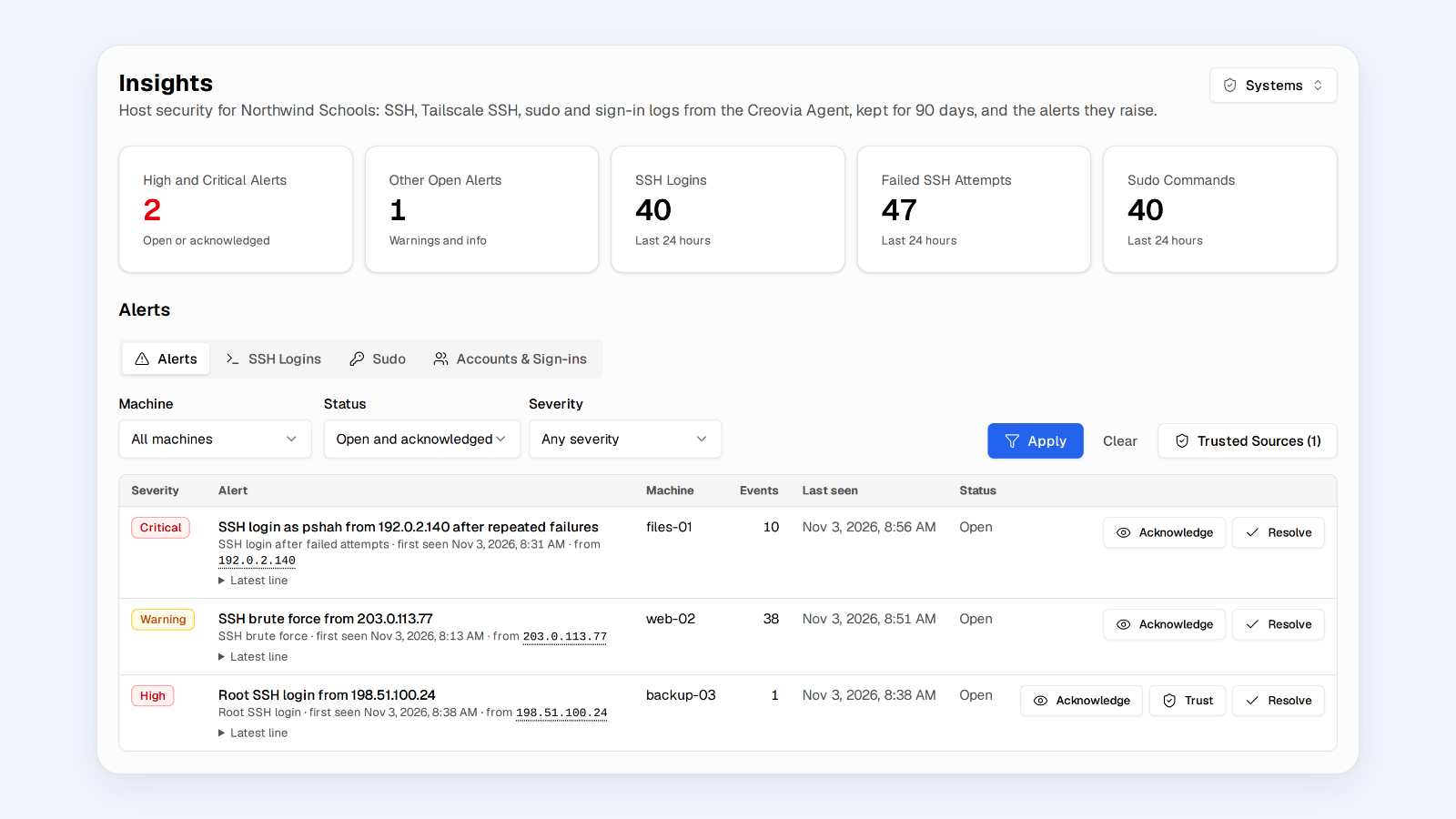
Insights now covers your servers as well as your apps. Systems collects every machine's SSH, sudo, and sign-in activity, keeps it for 90 days, and raises alerts for brute-force attempts, root logins, and logins from new addresses. Add the addresses you expect as Trusted Sources to keep those alerts quiet. Explore Logs gets a search bar with filters such as machine: and @status:>=500, and early ClickUp, HubSpot, Intercom, and GitLab sections show the week's work at a glance.
To open, go to Operations > Insights and choose Analytics or Systems. Connect ClickUp, HubSpot, Intercom, or GitLab under Admin Panel > Integrations.
And there's more
- Admin Panel: a new sidebar layout that opens on a Choose a Workspace page. Every page starts with summary tiles and trends, Bug Reports can be triaged in place, Health pages no longer time out, and Management › Access Review handles quarterly access reviews with sign-offs.
- Quote Generator: enter a Target Price per Student / Month and the discount is set for you. Add Product Discounts for specific products, write Combination Text for products sold together, and let company templates switch automatically by product. Also new: a Google Docs-style proposal editor, a four-step Create Quote with checks before you download, and version history. Everyone who can use Quote Generator can now edit Settings and company templates.
- Local times everywhere: every time on screen shows in your local time. Hover one to see the recorded UTC time.
- Recent Activity: now a table with a module dropdown. It records sign-ins, failed sign-ins, sign-outs, and passkey changes with IP address and browser, and it shows SSH sessions opened outside Tools. Click any IP address to see where it is, who owns it, and whether it is a VPN, Tor, or hosting address.
- Weekly summary email: sent Mondays at 7:30 AM with your visits, modules used, and any failed jobs from the week before. Turn it and other optional emails on or off under Profile > Email Settings. Profile Settings is now split into Account, Preferences, Email Settings, and Security.
- Maps: public maps load much faster on phones (in testing, the location list appeared at 0.8 seconds instead of 3.2), show your edits within seconds, use the font chosen in their style settings, and keep popups centered over their pin. The Analytics tab compares each period with the one before and adds a sortable Map Breakdown, and the PDF export matches it. Address autocomplete fills in city, state, ZIP, and coordinates, and public maps can be embedded on other websites.
- File Manager: backups can run scheduled restore drills that prove they can be restored. NWEA MAP exports can combine terms across the school year and show the MAP settings they need, and jobs no longer replace a delivered file with an empty one. e-IEPPro exports start with student ID and name, and interrupted exports can be retried from Logs.
- Also in Insights: opening Insights asks whether you want Analytics or Systems. Product Analytics can count traffic from Cloudflare Workers. Explore Logs no longer has a Level filter, because containers label levels too inconsistently for it to be reliable; search for the level instead.
- Charts: charts across Tools share one cleaner look with clearer tooltips. Webhook Manager Stats compares each period with the one before, and Admin Panel and Maps PDF exports match what you see on screen.
- Notifications: the bell in the top bar opens one panel with All, Alerts, Updates, and Shared tabs, including XL Compare files shared with your workspaces.
- On-Call: investigates real alerts on its own with read-only checks, replies in the Slack thread, and mentions people only when needed. It supports several alert channels and contacts, a team runbook, and a reasoning level, and it hides passwords and email addresses before sending an alert to the AI provider.
- Exports and buttons: Maps PDF, Admin Panel analytics, File Merge Sync, staff photos, and Product Generator CSV exports prepare in the background and download automatically. Slow actions show a busy button right away and ignore repeat clicks.
- XL Compare: highlighted and Reconciler exports run in the background without size limits, comparisons resume more reliably, and exports wait until every difference is resolved.
- Webhook Manager: the Events tab is a newest-first log with full details on click, and an expired session now takes you to the sign-in page instead of showing "Failed to load webhooks".
- Watch Dog: GitLab branch alerts arrive within seconds, and checks retry brief network failures before alerting.
- Sign-in: welcome emails include passkey sign-in, a warning appears before your session expires, and a new Google profile photo now updates your avatar everywhere.
- Calendar Events: recurring events appear for the next twelve months, with better time zone and all-day handling.
- Speed and reliability: the dashboard loads faster, updates reach you sooner without interrupting your work, and fixes land across XL Compare, Maps, Whiteboard, Product Generator, URL Validator, and Seating Chart.